

🛠️ Account Settings
Your Assignbots profile is where you manage personal information, password security, two-factor authentication, and more. You can access this area by clicking your initials in the top-right corner and selecting Profile from the dropdown menu. You can access your settings by clicking Account Settings from the sidebar on the main dashboard.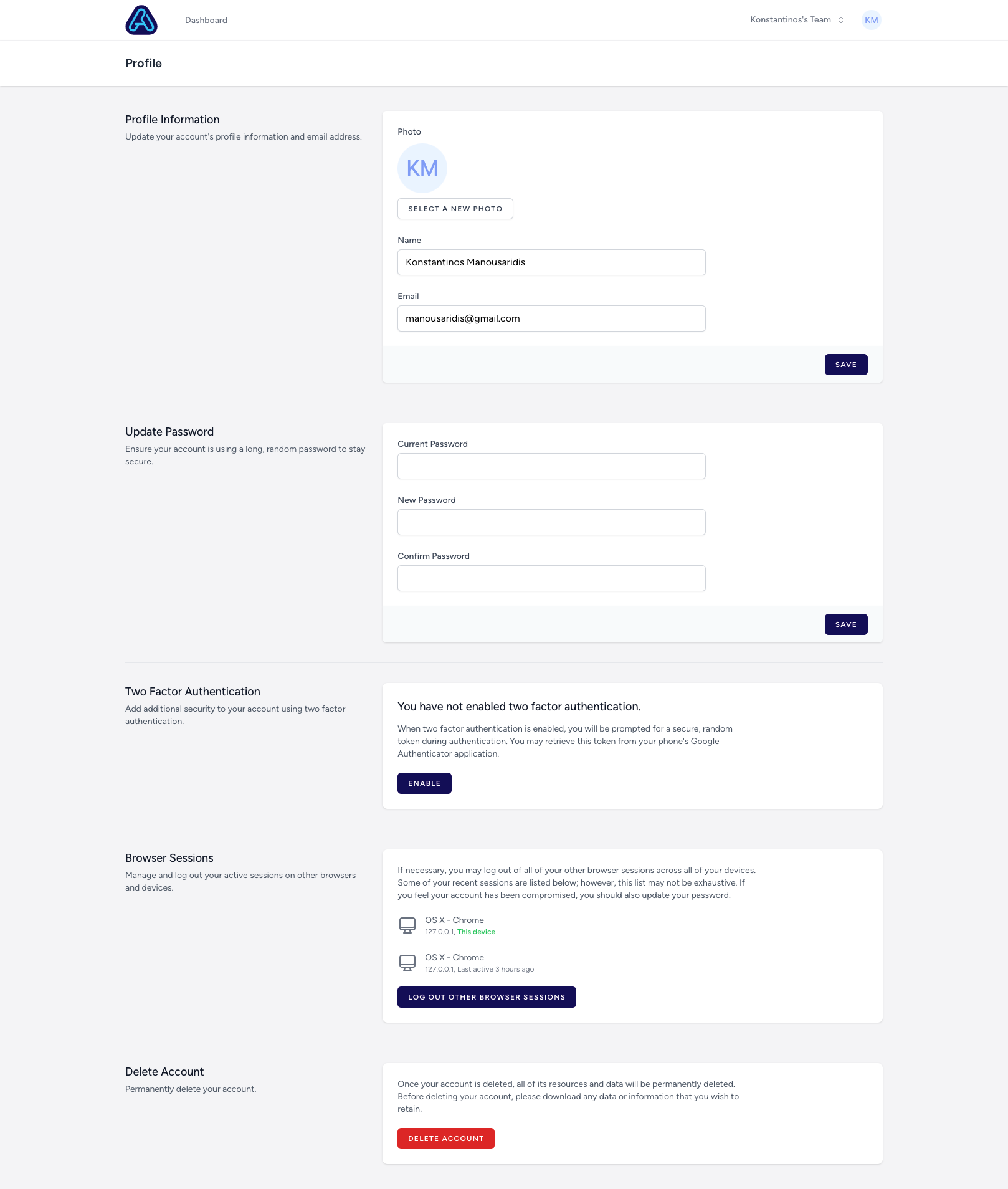
👤 Profile Information
- Update your name and email address by editing the fields and clicking Save.
- Upload or change your profile picture by selecting a new image.
🔐 Update Password
Keep your account secure by updating your password:- Enter your current password
- Choose a new one
- Confirm and click Save
🔒 Two-Factor Authentication (2FA)
To add an extra layer of protection:- Enable 2FA to use an authentication app (like Google Authenticator)
- Once enabled, you’ll be asked for a verification code every time you log in
🌐 Browser Sessions
- Review and manage all devices currently logged into your account
- Click “Log out other browser sessions” to revoke access elsewhere
❌ Delete Account
You can permanently delete your account and all related data:- Scroll to the bottom of the page
- Click the red “Delete Account” button
- ⚠️ This action is irreversible — all bots, teams, and content will be permanently erased
All your data is encrypted and hosted securely in isolated AWS infrastructure. Only you (or those you share with) have access.
All changes are saved immediately and take effect across the platform.